
Wed Apr 08 2026
Booking.com Rating System: The 36-Month Truth & ROI Guide
Executive Summary: Key Takeaways
Booking.com's review score has a direct financial impact — a higher score allows you to charge more and rank above competitors. Reviews are weighted by recency over a rolling 36-month window, meaning operational improvements show up in your score faster than most owners realise. This guide covers how the rating system works, what the sub-categories measure, and the practical steps to lift your score and protect it. We can help you with your motel marketing and Booking.com ranking.
Executive Summary: Key Takeaways
Booking.com's review score has a direct financial impact — a higher score allows you to charge more and rank above competitors. Reviews are weighted by recency over a rolling 36-month window, meaning operational improvements show up in your score faster than most owners realise. This guide covers how the rating system works, what the sub-categories actually measure, and the practical steps to lift your score and protect it.
Decoding the Booking.com Rating System: Recency, Velocity, and ROI
Booking.com’s Rating System has a significant financial impact on a motel. A higher review score allows a property to charge a higher room rate, and with all else being equal, your motel will rank higher than other motels if your Guest Review Score is higher.
One important thing to recognise is that a guest review is a personal opinion — some guests have high expectations, some guests just want a friendly welcome or to be treated with respect. As a motel owner or on-site motel manager, your role is to improve the aggregate review score. Avoid getting caught up in individual reviews. With so much personal investment in a motel, it is not always easy to do, but try to learn from each review and move on quickly when they seem harsh or unfair.
If your on-site manager is not performing and you see your guest review scores drop, reach out to us, even if it is just for a phone call. We have run many individual motels and motel groups. We understand the on-site manager dynamic and can work with them to get your motel back on track.
Booking.com Ratings Explained
- Upon guest checkout, Booking.com sends an email to guests asking them for a review. They have 90 days to leave a review.
- The guest leaves a review with a score between 1 and 10.
- New reviews have a higher weighting than old reviews — so if you work hard on your operation, you will see improvement faster.
- Guest reviews stay on the Review Page for 36 months. After this period, the reviews are archived on Booking.com.
- Once reviews older than 36 months are removed from the review page, your overall Guest Review Score is recalculated.
Booking.com Rating Scale
Guests who have booked and completed a stay can leave an overall score on the Booking.com Rating Scale from 1 to 10 based on their experience at your motel or hotel.
Note: This is the only required part of the review system to submit a review.
Your Review Rating out of 10 is one component of your overall Booking.com performance. We have written a focused article on improving your rank on Booking.com that covers the full algorithm in detail.
Booking.com Additional Rating Categories
Important: These sub-categories do not count towards your motel’s rating on the 1–10 scale.
- Staff
- Cleanliness
- Location
- Comfort
- Facilities
- Value for Money
- Free WiFi
The concept behind these sub-categories is to allow guests to rate specific parts of their stay that may not be in the control of the on-site motel manager, or that did not affect the overall experience, but will help other guests when booking.
Booking.com Total Number of Reviews
The total number of reviews evaluated in your Overall Booking.com Rating are reviews from the last 36 months only.
Booking.com Breakfast Ratings
This is an optional user review score found under the Most Popular Facilities tab or Review Categories. Similar to the Additional Rating Categories above, Booking.com Breakfast Ratings do not contribute to your overall Booking.com Review Score.
How to Improve Your Booking.com Guest Review Score
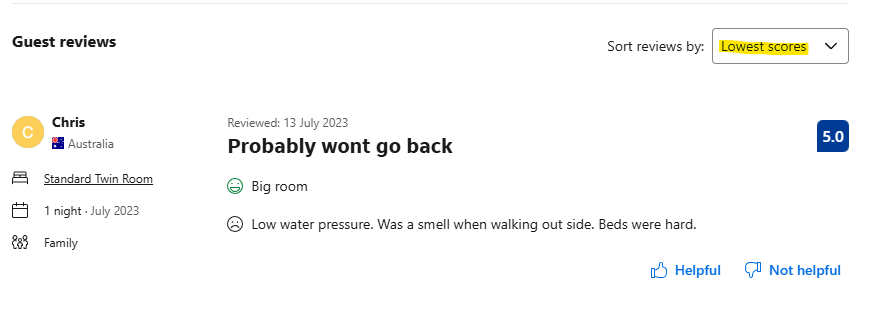
- Review all of your previous reviews and look closely at the text. Look at the big wins first — identify why you are getting your worst guest reviews. It might be consistently about a certain property fault. On Booking.com, you can filter by Lowest Score as shown below.
- Ensure your property reflects your service offering and that your details online match the service you provide. Small discrepancies in office hours, room types, rates, and on-site features cause a mismatch in expectations that lead to bad reviews.
- Confirm guest bookings and details prior to arrival, ensure all details are correct and ask if they have any questions about the location.
- Offer small perks — a welcome drink, bottled water, or chocolate on the pillow when a room is turned over — to drive good reviews and reduce the chance of guests fixating on minor issues. At Motel Coach, we find that small gestures above and beyond often prevent guests from raising issues during their stay.
Booking.com Verified Guest Reviews Policy
Reviews can only be left by guests who have booked and completed a stay, or who arrived at the property but did not stay. This strict requirement prevents non-guest reviews and stops competitors from submitting fake reviews to manipulate Overall Guest Review Scores.
Anonymous Booking.com Reviews
Guests were previously able to leave anonymous reviews to protect their privacy. This is no longer an option, except through older installations of the Booking.com app. Reviews submitted anonymously will remain on the platform as per the 36-month policy.
How to Remove a Bad or Misleading Booking.com Review
Booking.com will not remove reviews unless there is a valid reason. You can contact Booking.com through the Extranet to request a review removal.
Booking.com review removal is permitted under the following conditions:
- Terrorism-related content, hate speech, discrimination, harassment, content promoting violence, bullying, threatening, obscene, or offensive content
- Content that offers, sells, or attempts to sell illegal or restricted goods
- Animal welfare violations
- Content of a sexual nature
- Content for the purpose of selling promotion
- Spam
- Misleading or deceptive practices
- Intellectual property, privacy, or confidential information shared without consent
- Reservations where the guest did not stay
Booking.com Review Policy on Incentives
Booking.com prohibits motels and hotels from offering any incentives to drive guest reviews. See their official review incentives policy for full details.
Optimising Booking.com for Your Motel
Part of optimising your motel’s profitability is optimising the visibility of your distribution channels — Booking.com, Expedia, and your Google Business Profile. If you are struggling to optimise these channels, contact us and we can support your motel operation.
Need help with your Booking.com score?
We work with independent motel operators across Australia to improve review scores, rank higher on Booking.com, and shift volume to direct bookings. Book a free call to discuss your property.
Book a Free Consultation